
User guide Taxi H.C.T app
Taxi H.C.T. – Hengelo Class Taxi · available 24/7
User guide: the Taxi H.C.T app
With the free Taxi H.C.T app you book a taxi in Hengelo and the surrounding area in just a few taps. You see the price before you book, follow your driver live on the map, and pay online or by card or cash to the driver. On this page we explain step by step how everything works, with pictures of the app.
- Download the app
- Create an account
- Confirm your e-mail address
- Log in and forgotten password
- Book a ride
- Payment
- Airport ride and return ride
- Follow your taxi live
- Get in safely: ride PIN and safety
- Cancel a ride
- After the ride: rating, tip and receipt
- Your account, favourites and business
- Help, lost items or a complaint
- Delete your account
- Frequently asked questions
1. Download the app
The app is free and works on Android phones and iPhones.
- Android (Samsung, Google Pixel, etc.): open the Google Play Store, search for Taxi H.C.T and tap Install. Or use the button at the top of this page.
- iPhone: open the App Store, search for Taxi H.C.T and tap Get.
Then open the app. The first time, the app asks whether it may use your location. Choose Allow (or “While using the app”): the app then fills in your pickup address for you. Also allow notifications, so you get a message as soon as your driver is on the way or at your door.
2. Create an account
You can look around and check prices without an account. To book a ride you need an account with a confirmed e-mail address. That way we know who is booking, you receive your receipt by e-mail and you can see your rides on any phone.
1Open the menu
On the home screen, tap the round button with three lines ☰ at the top right. At the top of the menu you will find the Account block. Tap the Create account button.
Trying to book without an account? The app opens this screen automatically. Once your account is created, you simply continue with your booking.
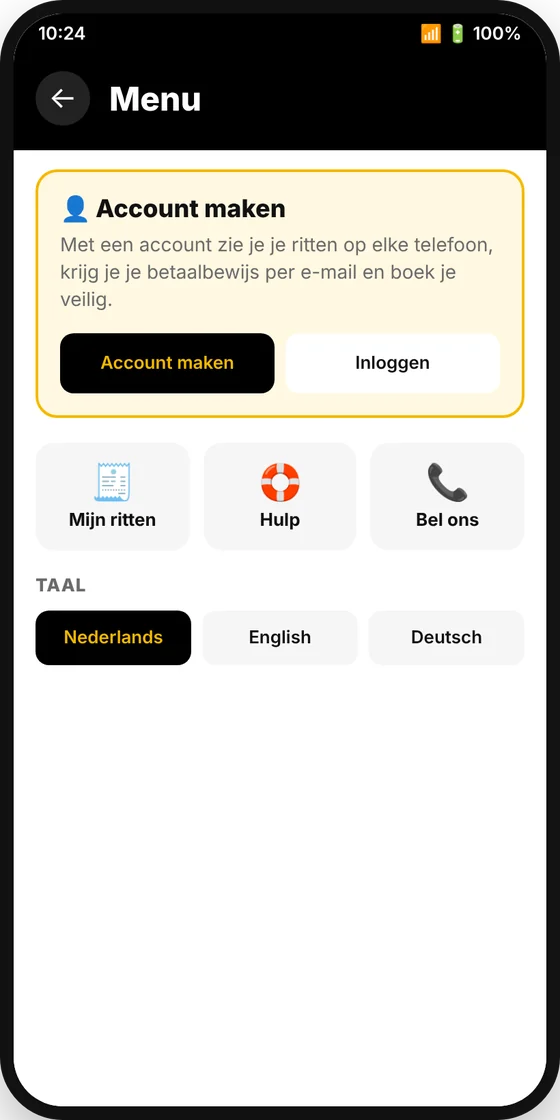 Menu without an account
2Enter your details
- Name: your first and last name (the driver sees your name).
- Phone number: so the driver can call you if he cannot find you.
- E-mail address: a real e-mail address that you can open. Temporary or “disposable” addresses are not accepted.
- Password: at least 8 characters. Choose a password you do not use anywhere else.
Tick I agree to the privacy policy and tap Create account.
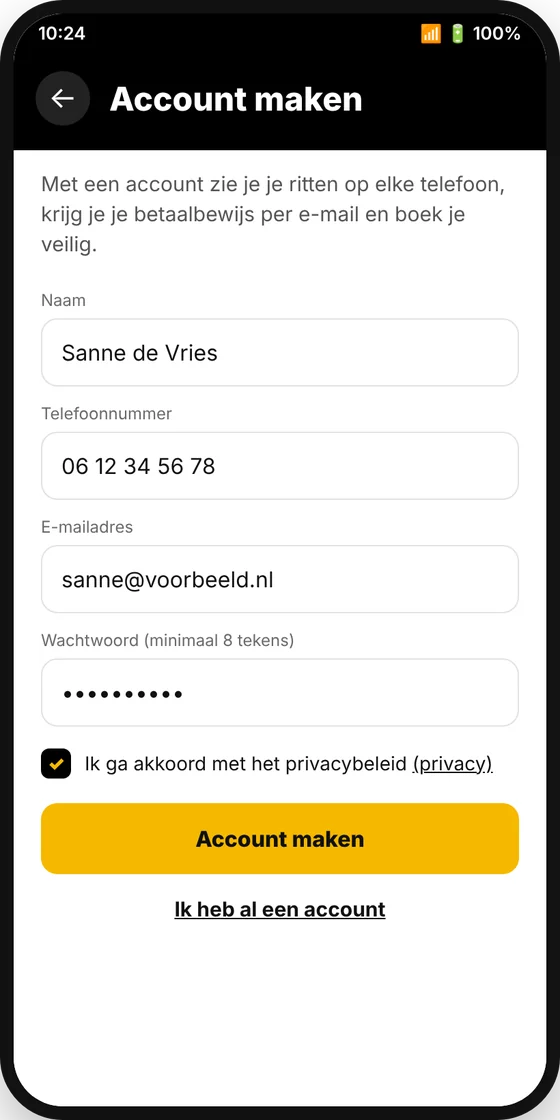 Create account
3. Confirm your e-mail address
3Open the e-mail
Right after you create your account, we send you an e-mail asking you to confirm your e-mail address for Taxi H.C.T. Open this e-mail on your phone or computer and tap the link in it. You will then see a message that your e-mail address has been confirmed.
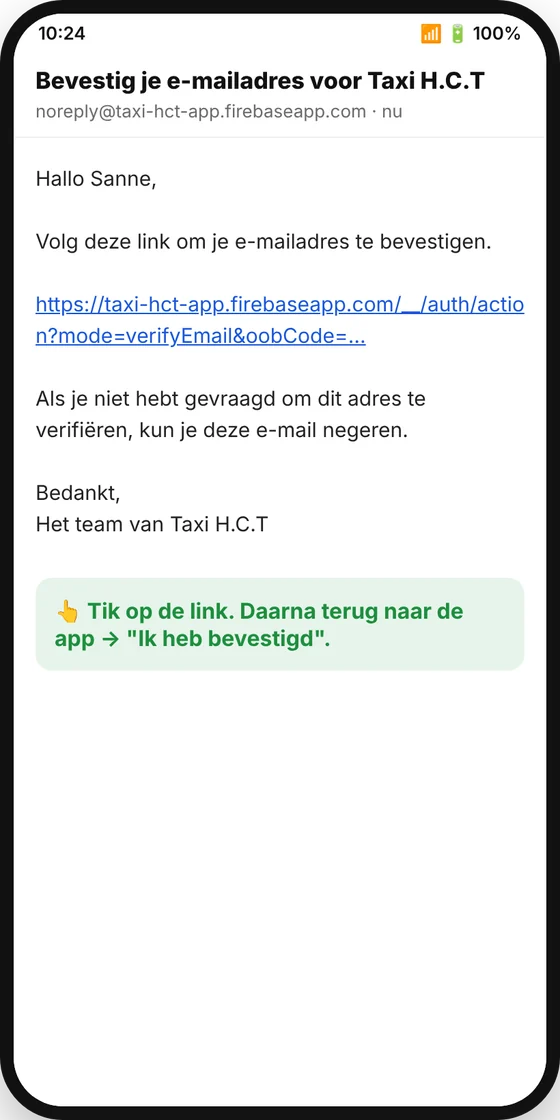 The confirmation e-mail
4Tap “I have confirmed”
Go back to the app and tap I have confirmed. Your account is now ready and you can book.
Did you enter the wrong e-mail address by mistake? Tap Use another e-mail address and start again.
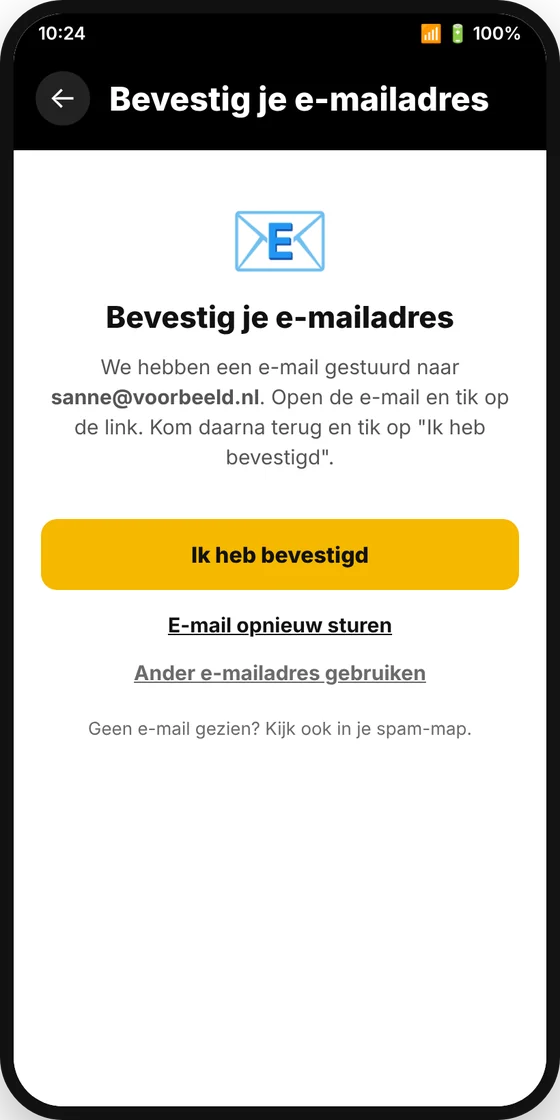 Confirming in the app
4. Log in and forgotten password
Do you already have an account, for example on a new phone? Open the menu ☰ and tap Log in. Enter your e-mail address and password and tap Log in. You stay logged in afterwards, even when you close the app.
Forgot your password? Enter your e-mail address and tap Forgot password?. You will receive an e-mail with a link to choose a new password.
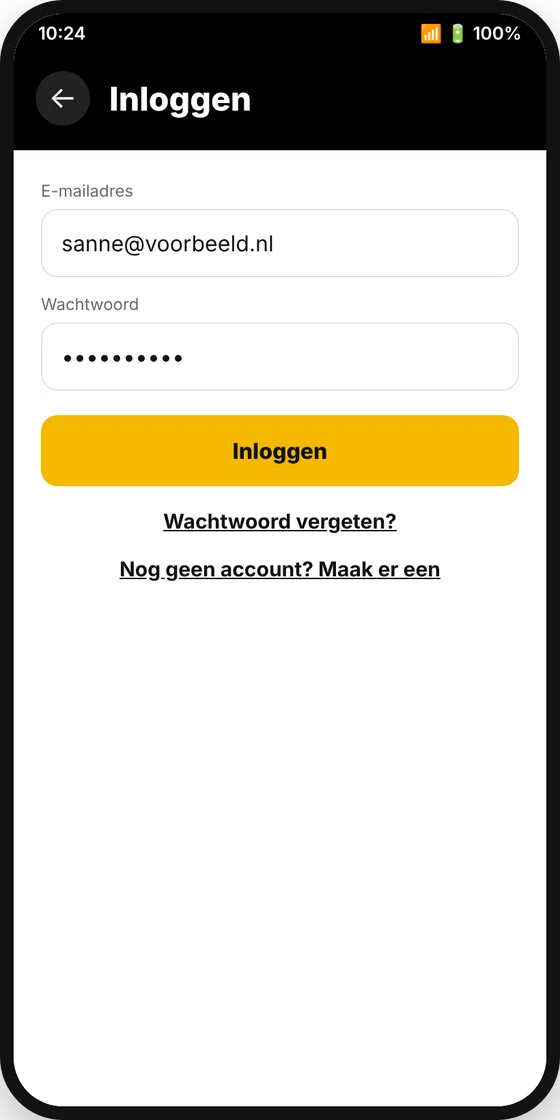 Log in
5. Book a ride
1Choose where you want to go
On the home screen, tap Where to? and type the address or town of your destination. The app fills in your pickup address using your location; you can also change it yourself.
- Home, Work and your favourites appear as shortcut buttons below the search field.
- Under Your location you can see how many taxis are available and how soon one can be with you.
- Want to ride later? Tap 🕒 Later and choose the day and time. You can plan weeks ahead.
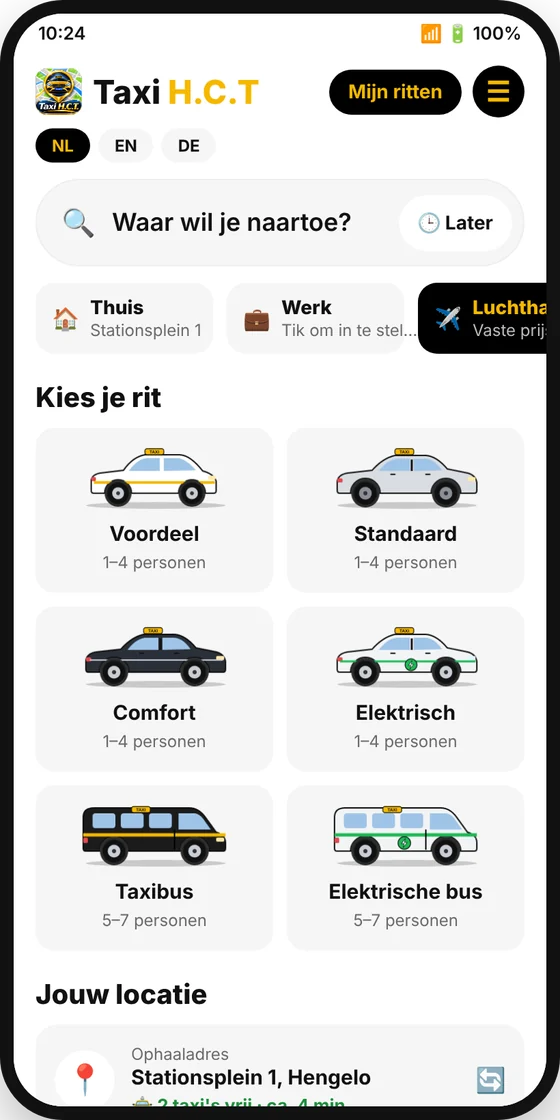 Home screen
2Choose the number of passengers and your ride
You see the route on the map, the distance and the travel time. Use − / + to set the number of passengers and choose a ride type. Each ride type shows a fixed price: that is what you pay, with no surprises afterwards.
| Ride type | For whom |
|---|---|
| H.C.T. Saver | Good value, 1 to 4 passengers |
| H.C.T. Standard | Our regular taxi, 1 to 4 passengers |
| H.C.T. Comfort | Extra comfortable car, 1 to 4 passengers |
| H.C.T. Electric | Fully electric car, 1 to 4 passengers |
| H.C.T. Taxi van | Groups of 5 to 7 passengers |
| H.C.T. Electric van | Electric taxi van, 5 to 7 passengers |
If you choose more passengers than fit in a car, the app automatically selects the taxi van. On longer rides you automatically get a discount; the price without discount is shown crossed out next to it.
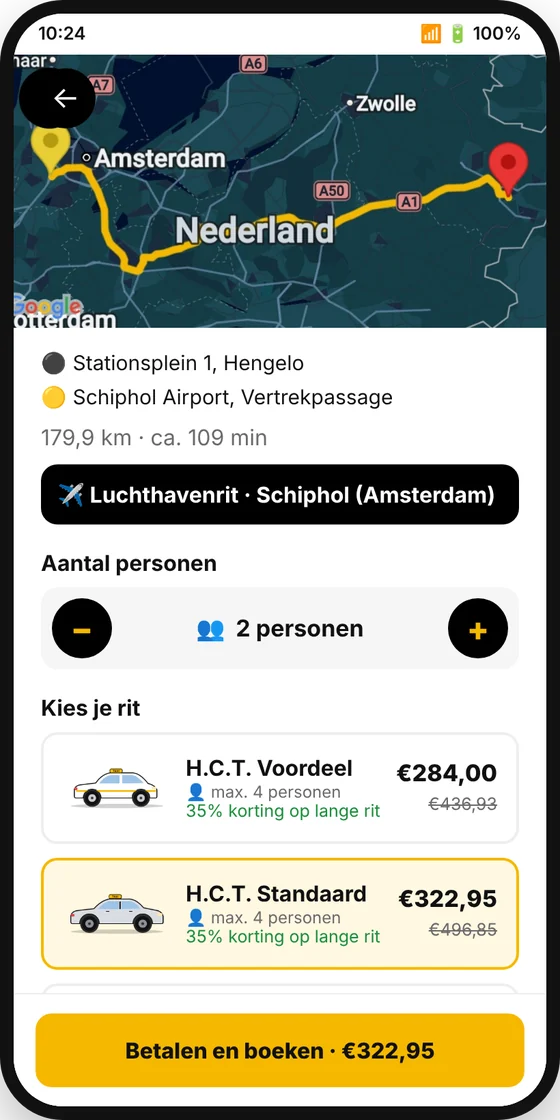 Ride type and price
3Check your details and book
Scroll down. Your name and phone number are already filled in. Under Note for the driver you can add, for example, a flat number, “entrance at the back” or “lots of luggage”.
Do you have a promo code? Enter it and tap Apply; you will see the new price straight away.
Then choose how you want to pay (see below) and tap the yellow button at the bottom: Pay and book (online) or Book (card/cash to the driver).
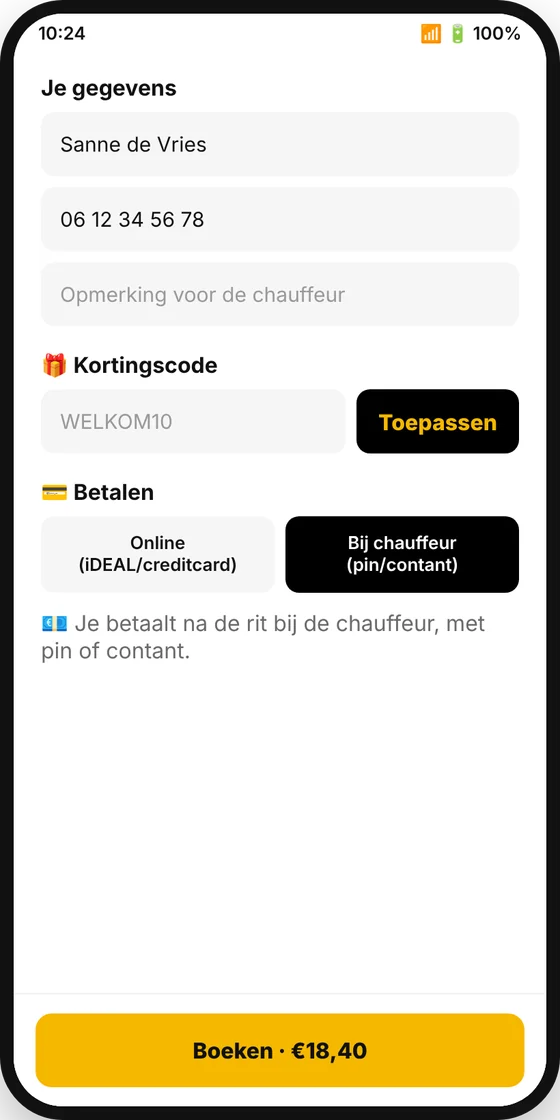 Details, promo code and payment
6. Payment
For every ride you choose how you pay:
| Payment method | How does it work? |
|---|---|
| Online (iDEAL / Wero, credit card, Bancontact) | After booking, the secure myPOS payment page opens. Choose your payment method and complete the payment. You then return to the app automatically and see “Ride received”. Your ride is only booked once the payment has succeeded. |
| Pay the driver (card or cash) | You book straight away, without a payment page. After the ride you pay the driver by bank card or in cash. |
7. Airport ride and return ride
To or from the airport
On the home screen, tap the ✈️ Airport button. At the top, choose To the airport or From the airport (pick-up) and tap your airport: Schiphol, Düsseldorf, Eindhoven, Münster/Osnabrück, Dortmund, Weeze, Rotterdam The Hague or Cologne/Bonn.
Airport rides from Hengelo and the surrounding area have fixed prices. You can recognise them by the “Fixed price” label in the app.
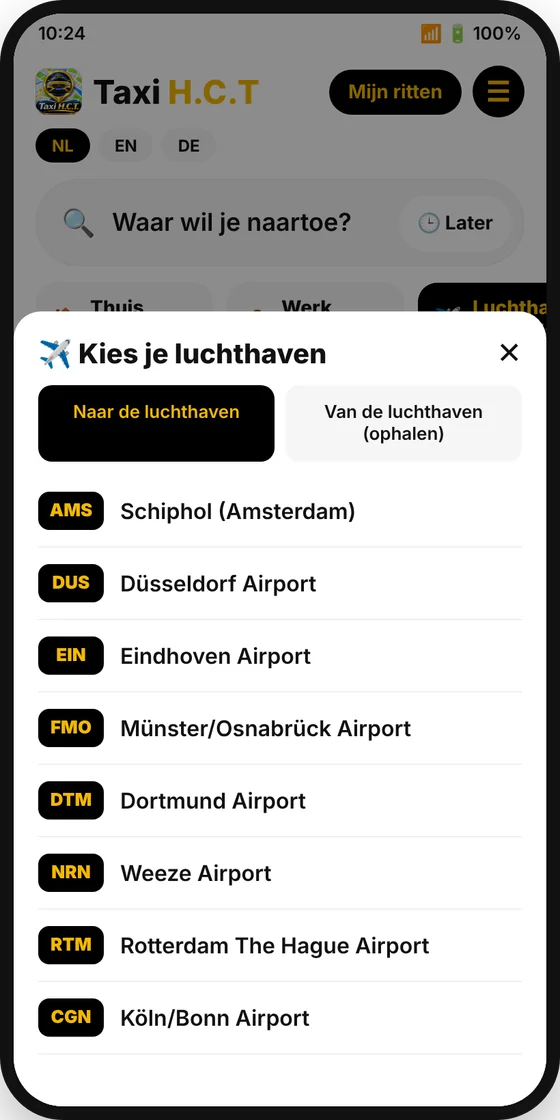 Choose an airport
Flight number and return ride
- Enter your flight number (for example KL1345). When you are picked up at the airport, the driver can then take delays into account.
- Switch on Add return ride to book your journey back at the same time. Choose the day and time of the return ride and, if you like, the flight number of your return flight. You pay for both rides in one go and get a separate booking number for each.
- Travelling for work? Switch on Business ride; the invoice is then made out to your company (see chapter 12).
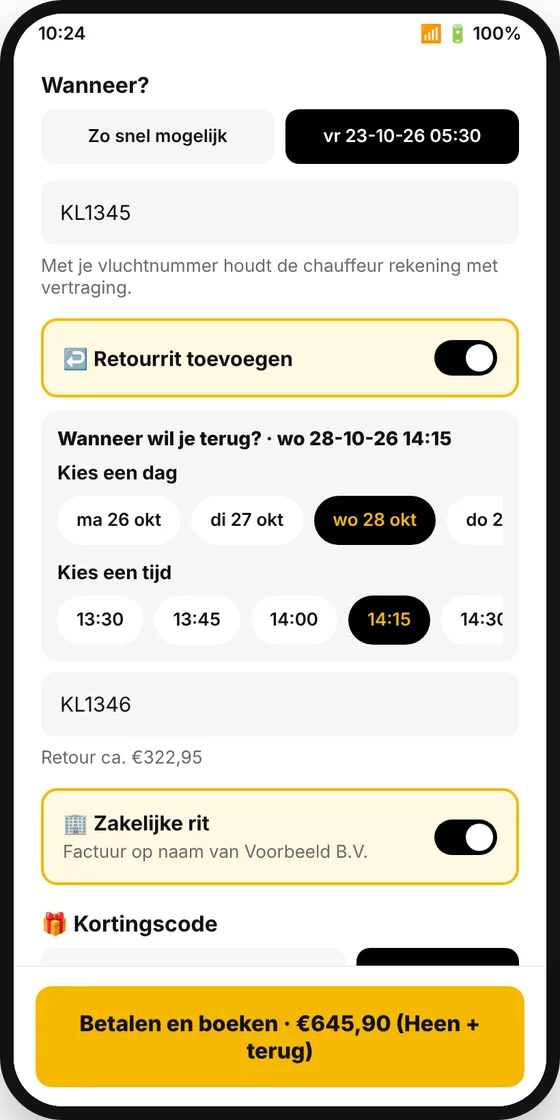 Flight number and return
8. Follow your taxi live
Ride received
After booking you see “Ride received – finding a driver” with your booking number (for example HCT-10042) and your ride PIN. As soon as a driver accepts the ride, you get a notification and see who is coming.
You can find all your rides under My rides on the home screen.
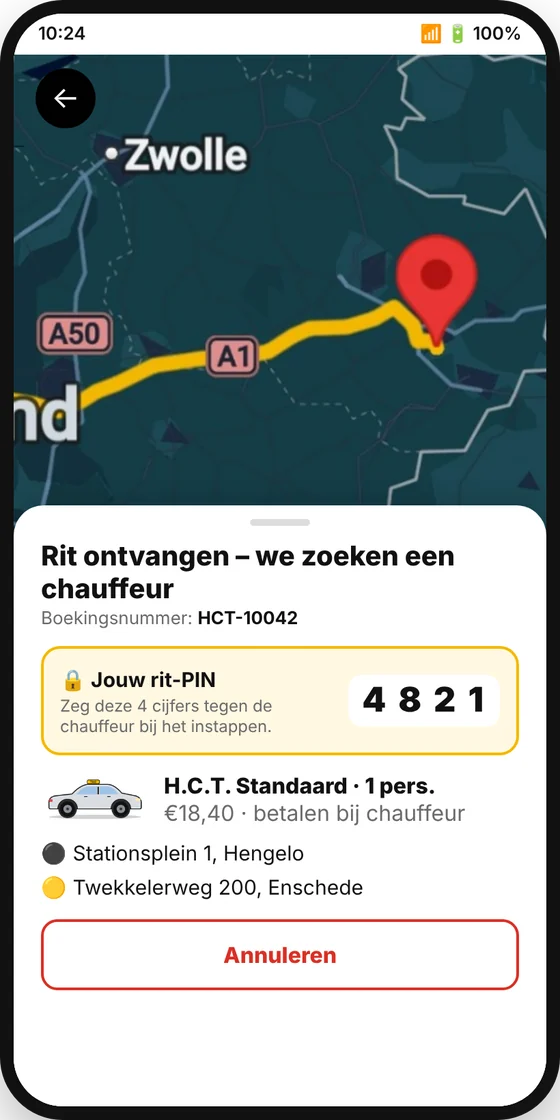 Ride received
Your driver is on the way
On the map you see the taxi driving live. The black block shows how many minutes it will take and how far away the driver still is. You also see:
- the driver’s name and photo, his rating, the car and the number plate;
- 💬 Chat: send the driver a message (for example “I’m at the back entrance”);
- 📞 Call: call the driver directly;
- 📍 Share ride: send a link to family or friends, so they can follow the taxi live too.
Tap the small bar at the top of the white panel to make it bigger or smaller and see more of the map.
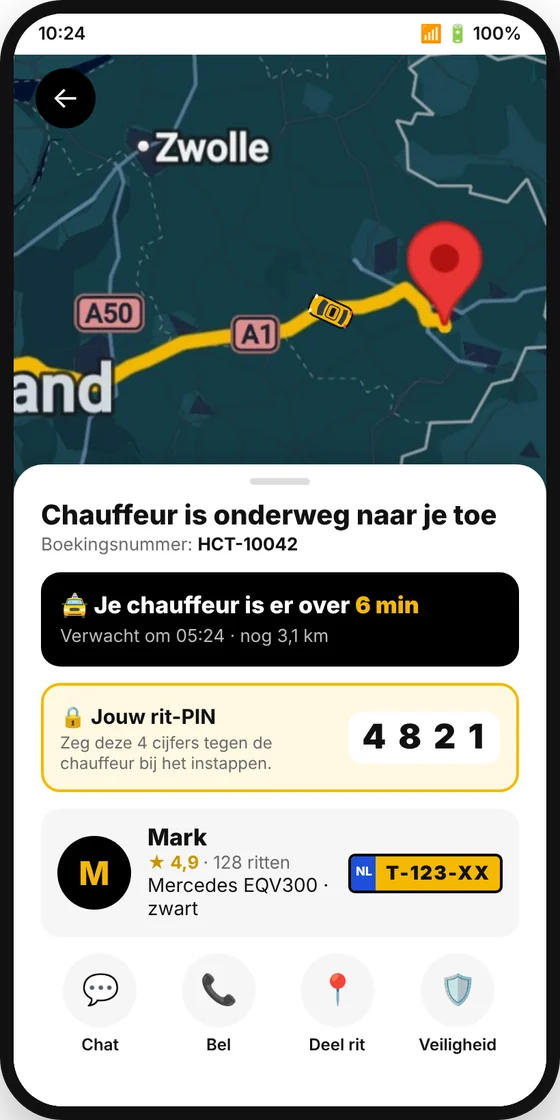 Follow your taxi live
9. Get in safely: ride PIN and safety
The ride PIN
For every ride you get a 4-digit ride PIN. Tell the driver these digits when you get in. The driver enters them in his app; the ride can only start when the PIN is correct. This way you know for sure that you are getting into the right taxi.
Always check that the number plate, the car and the driver match what the app shows.
The Safety button 🛡️
- Call 112: only in an emergency;
- Share your ride live with someone you trust;
- Check your taxi: number plate, car and driver;
- Report a safety issue: we will contact you as soon as possible;
- Call us: +31 74 781 11 11, day and night.
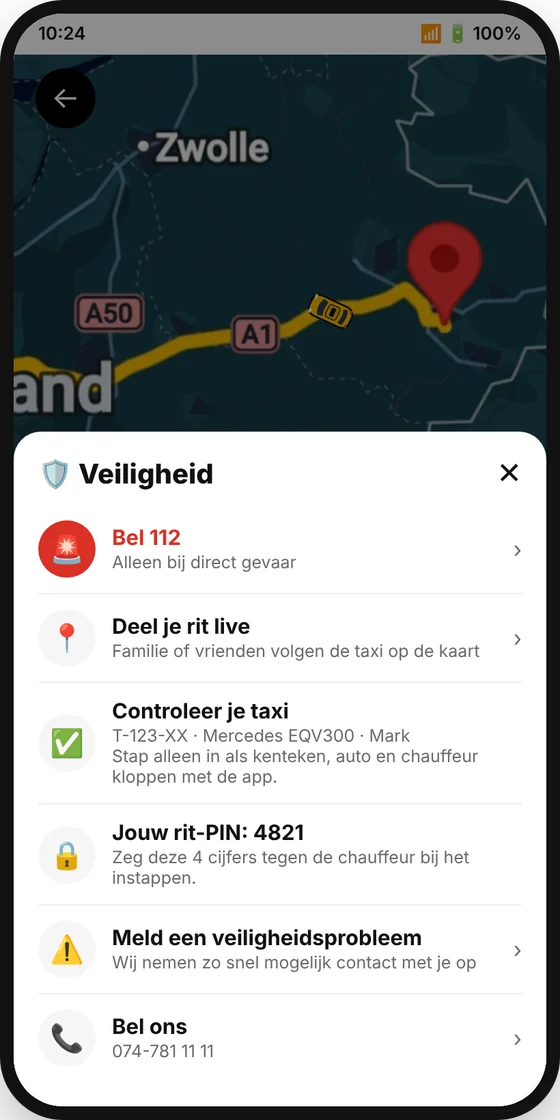 Safety
10. Cancel a ride
Open your ride (via My rides or the notification) and tap Cancel at the bottom. The app first shows what cancelling means for you. Tap Yes, cancel to confirm, or No to keep the ride.
| When do you cancel? | Costs | Paid online? |
|---|---|---|
| There is no driver yet, or the driver has accepted the ride but is not on the way yet | Free | You get the full amount back. |
| The driver is already on the way to you or is already at your door | Cancellation fee; you see the amount in the app before you confirm | You get the amount back minus the cancellation fee. |
| You are not there when the driver arrives (the driver first waits at least 5 minutes) | Cancellation fee | You get the amount back minus the cancellation fee. |
Refunds are automatic and go to the same account or card you paid with. With iDEAL/Wero the money is usually back in your account within 1 to 3 working days.
Did you book a return ride? The outward and return rides are two separate rides. You can cancel them separately.
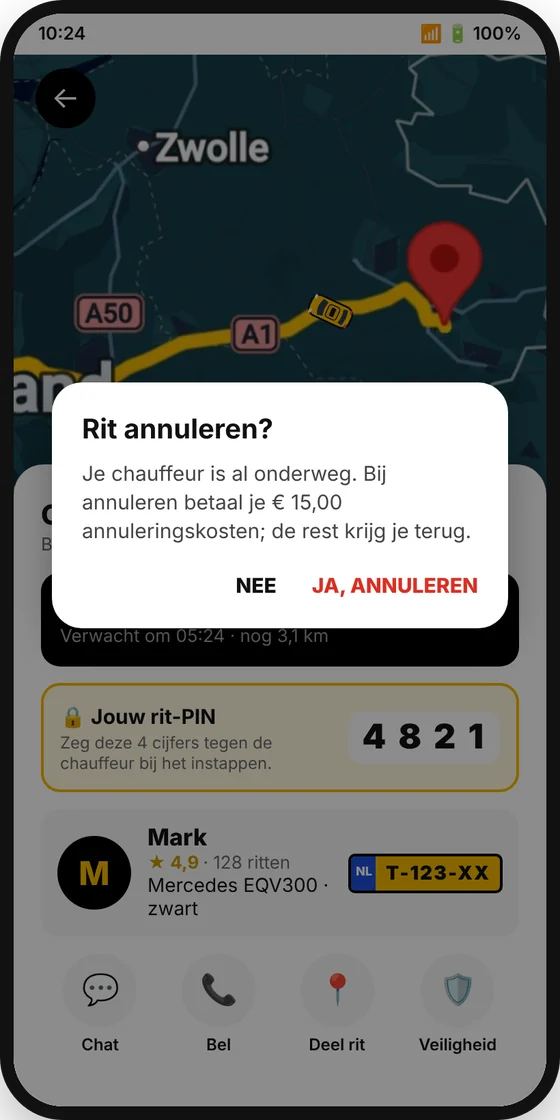 Cancel a ride
11. After the ride: rating, tip and receipt
When the driver completes the ride, you see “Ride completed – thank you!”. Below that:
- How was your ride?: give 1 to 5 stars and, if you like, a comment. If you give 4 or 5 stars, we ask whether you would also like to leave us a Google review; that helps us enormously.
- Tip your driver (optional): tap €1, €2, €5 or €10. You pay the tip securely online; the driver gets a notification. A tip is never required.
- Invoice / receipt: tap View receipt or E-mail receipt. The receipt is also sent to your e-mail address automatically after the ride.
Tap New ride to go back to the home screen.
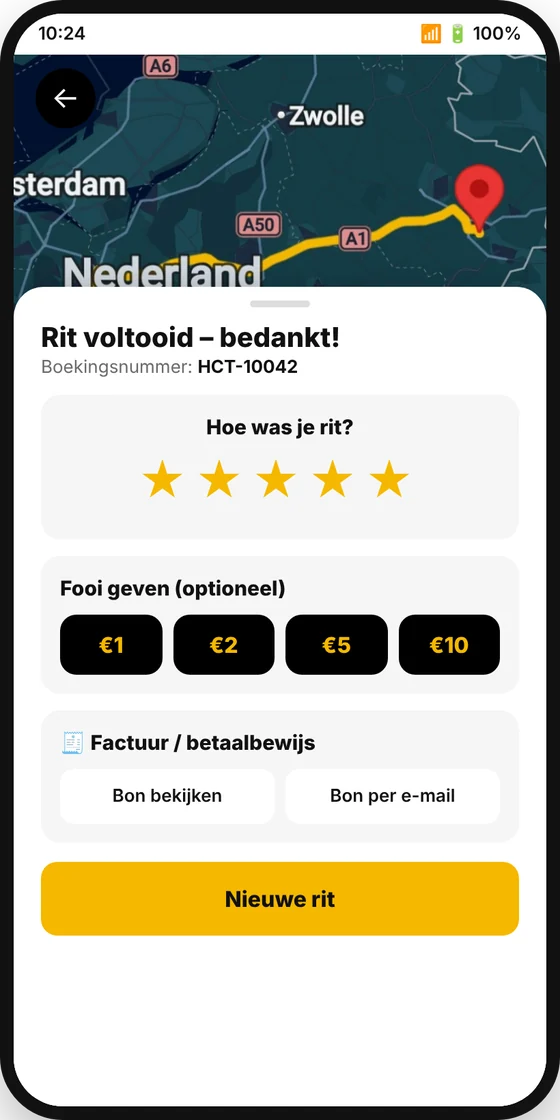 After the ride
12. Your account, favourites and business rides
Open the menu ☰. There you will find:
- My rides: all your rides, with booking number, status and receipt.
- My details: change your name and phone number.
- Business account: enter your company name, Chamber of Commerce (KvK) number, VAT number, company address and, if you like, a separate e-mail address for invoices. For a business ride you get an invoice in your company’s name, with VAT shown separately. You can also add a reference or cost centre per ride.
- Saved places: set Home and Work and add your own favourites (for example the gym or the hospital). They then appear as shortcut buttons on the home screen.
- Language: Nederlands, English or Deutsch.
- Log out and Request deletion of my data.
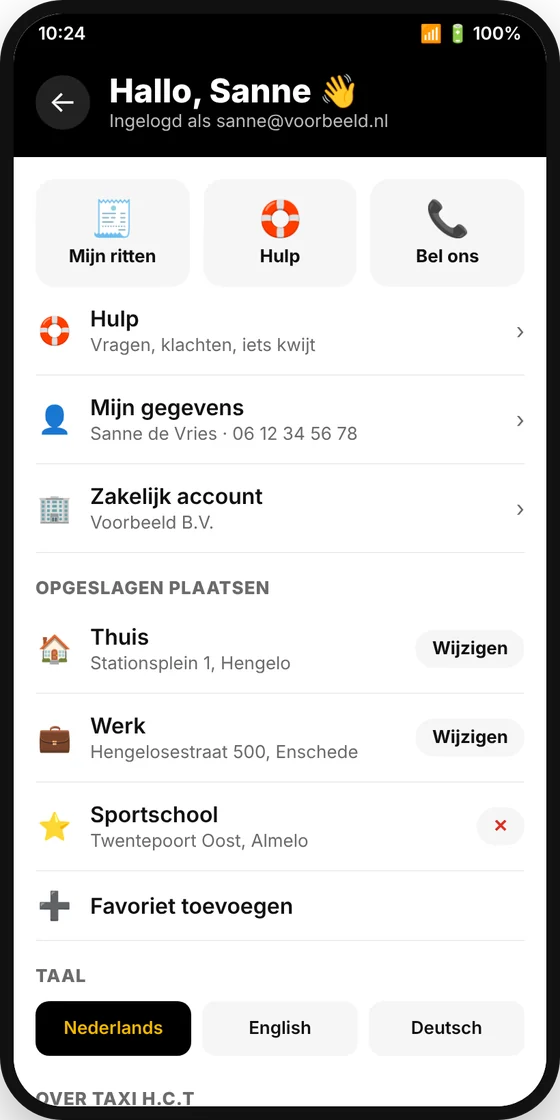 Menu with account
13. Help, lost items or a complaint
Tap Help in the menu. You can call or e-mail us directly, or send us a message about:
- Lost item: choose the ride and describe what you lost. The driver checks the car straight away.
- A question, the price, the driver, payment, safety or something else.
Enter your phone number or e-mail address so we can reply. Below the form you will find the frequently asked questions.
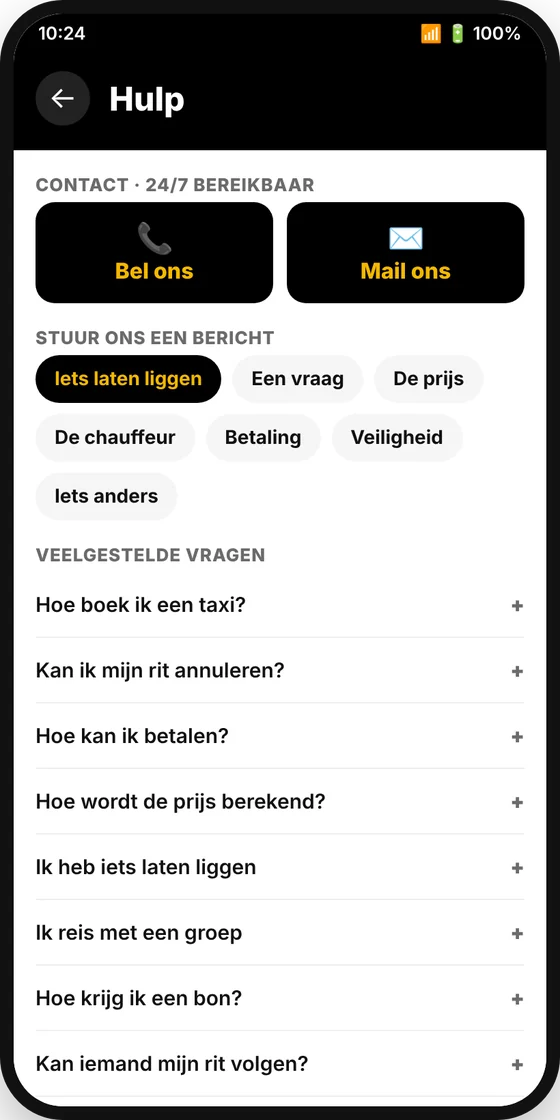 Help and contact
14. Delete your account
Would you like your account and data to be deleted? Open the menu ☰ and tap Request deletion of my data at the bottom. After you confirm, your account, saved places and details are deleted. Your past rides are only kept anonymously for our accounts. You can read more in our privacy policy.
15. Frequently asked questions
What customers say about us
based on 15 Google reviews
07-10-2026
Nice drive to Enschede South, right on time, he helped us with the suitcases in the trunk, highly recommended, thank you Ali
07-10-2026
As agreed, he arrived right on time, clean car, drives calmly, nice driver, thank you.
07-10-2026
Nice driver, right on time, fixed price, clean car, smells good inside, highly recommended. Top Taxi H.C.T. Thank you.
28-09-2026
Nice, polite driver. Price by agreement from the station in Germany to the Netherlands.
22-09-2026
Truly a top-notch company. Always friendly, on time, and always good drivers. Definitely recommended for everyone.
25-02-2026
Great service! The driver was friendly, on time, and drove safely. The car was clean and comfortable. Highly recommended!
10-04-2025
Good company, good service, clean car, and a friendly driver. Highly recommended.
25-03-2025
Very nice man, drives carefully and the price he charges is also fine.
07-09-2021
Ali is a friendly driver who knows his trade and drives good, reliable cars. I can confidently say he's a highly valued colleague driver.
Frequently asked questions – taxi Hengelo
How do I book a taxi in Hengelo?
Simply book online, call 074-781 11 11 or send a WhatsApp to 074-781 11 11. We confirm your trip as soon as possible.
How much does a taxi in Hengelo cost?
For 1 to 4 passengers the start rate is € 4.31, plus € 3.17 per kilometre and € 0.52 per minute. For groups in the minibus it is € 8.77 start, € 4.00 per kilometre and € 0.59 per minute. From 12 km you get 15% discount, from 100 km even 35%. Use calculate fare to see the price in advance.
How much is a taxi from Hengelo to Schiphol?
For airport transfers we agree a fixed price in advance. A trip from Hengelo to Schiphol costs € 329 for 1 to 4 passengers. Travelling as a group? Calculate the price instantly.
Is Taxi H.C.T. available 24/7?
Yes. We drive 24 hours a day, 7 days a week, including weekends, public holidays and in the middle of the night.
Can I travel as a group?
Yes. Our Mercedes CLA takes 1 to 4 passengers; groups travel comfortably in the Mercedes EQV300 minibus. For larger parties we automatically use several vehicles.
How much luggage can I bring?
The car has room for up to 4 suitcases and 3 pieces of hand luggage. The minibus takes up to 7 suitcases and 5 pieces of hand luggage.
Can I cancel free of charge?
Yes. If you cancel your taxi, no costs are charged.
How can I pay?
You can pay online when booking (iDEAL, Wero, credit card), or in the taxi in cash, by debit card or credit card. No extra costs are charged.
Is a child seat required in the taxi?
No, a child seat is not legally required in a taxi. Children shorter than 1.35 metres without a child seat always travel in the back seat. You are of course welcome to bring your own child seat.
Do you take my flight times into account?
Yes. Enter your flight details when booking. We plan your trip with plenty of time and adjust the pick-up time on your return to your arrival.
Do you also drive to Germany?
Certainly. We drive to Düsseldorf, Weeze, Münster Osnabrück, Nordhorn and Gildehaus, among others, and to airports throughout the Netherlands.
Which cars do you drive?
We drive luxurious, modern Mercedes-Benz vehicles: the Mercedes CLA 250e for 1 to 4 passengers and the spacious Mercedes EQV300 for groups.
Book a taxi right away?
Call us, send a WhatsApp or book online. We are always ready for you.